All Nations Church / Onboarding / Website & Marketing
← Back to Presentation
A
Alisha
Website & Marketing
Your department

Notion for Website & Marketing

From tracking website updates to managing campaigns and storing design assets β€” Notion gives you a clear view of everything your team is working on, all in one place.

🌐 Website Updates πŸ“£ Campaigns 🎨 Design Assets πŸ“Š Analytics
Website & Marketing
Use cases

How Website & Marketing uses Notion

🌐

Website Update Tracker

Every requested change, its status, and who's handling it
β–Ό

Website update requests come from every direction β€” events team need a new events page, HR need a staff bio updated, Communications need a new sermon series banner. A Notion database becomes the single queue for all of these requests.

Each request has: what needs changing, which page, who requested it, priority, and status. You can see exactly what's in your queue, what's been done, and what's been deprioritised.

What this looks like in Notion
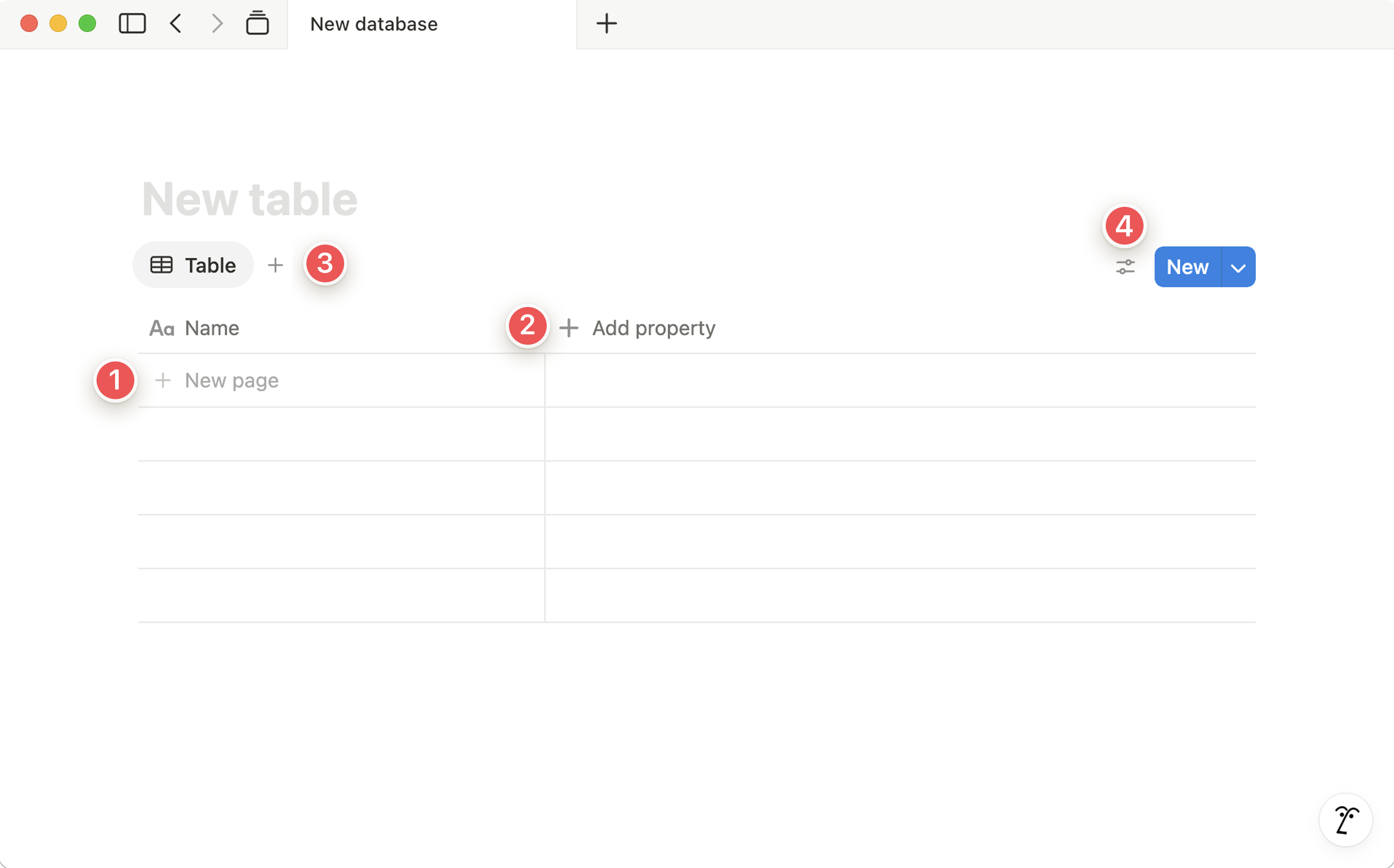
Notion database table β€” request tracker
1 New page β€” add a row / entry to your database
2 Add property β€” add a column (Date, Status, Person…)
3 Add view β€” switch to Board, Calendar, Gallery & more
4 New + Settings β€” create entries & configure filters/sorts
🌐 Website Change Requests
Update sermon series banner β€” Home page In progress
Add Summer Events page Done
Fix broken contact form Queued
New staff bio β€” Cassy Awaiting photo
πŸ’‘ Create a simple Notion form for other departments to submit website requests. It goes straight into your tracker without you having to log it manually.
πŸ“£

Campaign Planning Board

Every marketing campaign from brief to launch β€” visible and on track
β–Ό

A Notion campaign database holds every marketing initiative: the brief, objectives, target audience, key messages, deliverables, channels, timeline, and results. All in one page, all connected.

Inside each campaign page, embed a task list for each deliverable β€” social assets, web banners, email copy, print materials β€” with assignees and deadlines. Board view gives you a pipeline overview; Calendar view shows you the launch schedule.

What this looks like in Notion
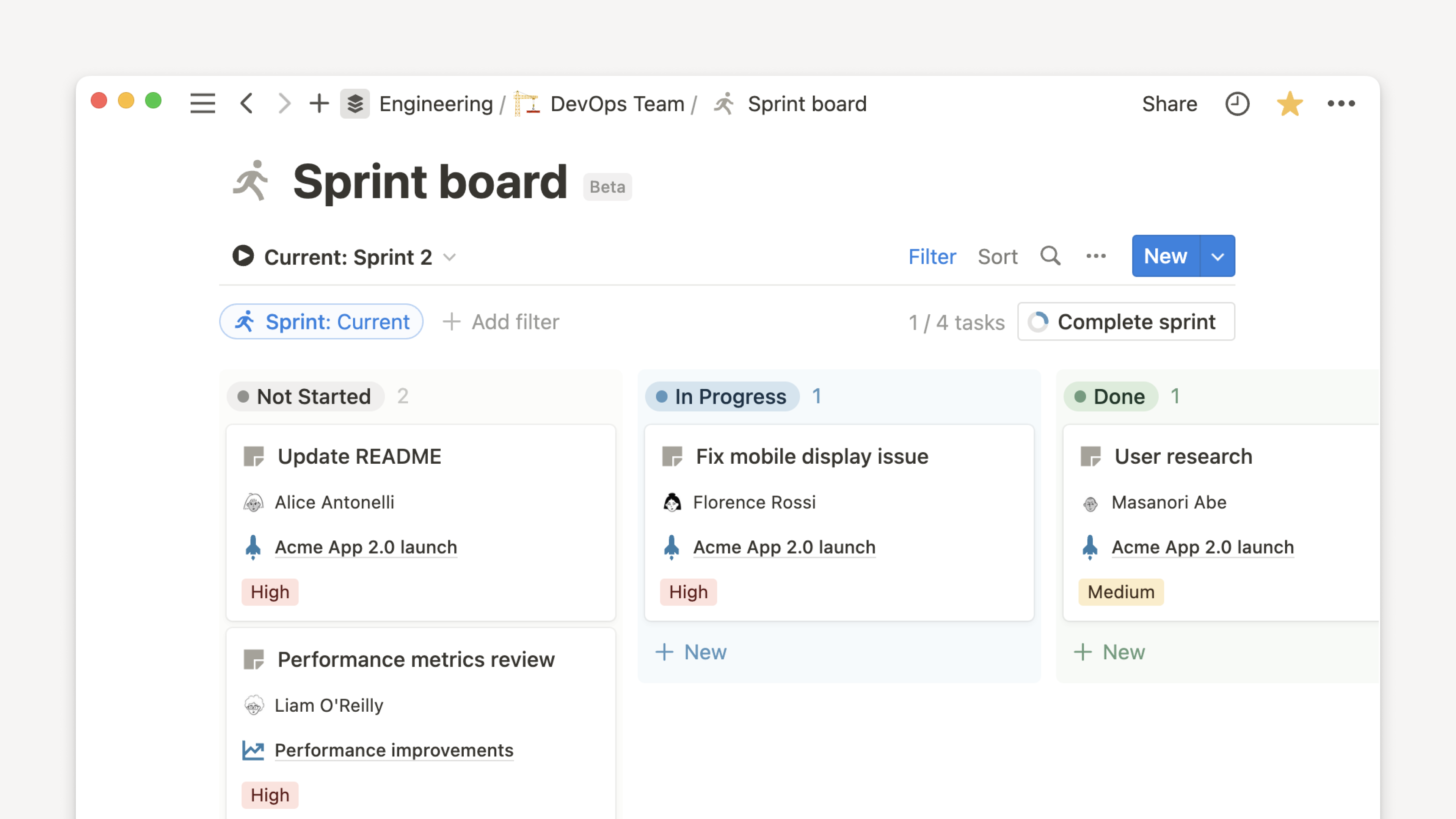
Notion board view β€” campaign pipeline
πŸ“£ Marketing Campaigns
Easter Campaign 2026 Complete
Summer Community Outreach Active
Vision Sunday 2026 Planning
Christmas Season Not started
πŸ’‘ Link campaigns to your Content Calendar database β€” so when you're scheduling posts, you can see which campaign each post belongs to and filter accordingly.

🎨

Design Asset Register

Approved logos, colours, fonts, and templates β€” always findable
β–Ό

Create a Notion page that acts as the brand asset hub β€” not where the files live (that's Google Drive), but the front door to them. Clear links, descriptions, and guidance on when to use each asset.

Include brand colours (with hex codes), approved fonts, logo variations and usage rules, photo guidelines, and template links. Anyone in the church wanting to create something has one place to go to stay on-brand.

🎨 Brand Asset Register
🟧 Primary logo (PNG, SVG) β€” dark & light versions
🎨 Brand colours β€” #CB5928, #111111, #F7F7F5
πŸ”€ Approved fonts β€” Inter (headings), Lato (body)
πŸ“„ Social media templates β€” Canva links
πŸ–Ό Photography guidelines β€” style & usage
πŸ’‘ Add a "Do / Don't" section with visual examples of how the brand should and shouldn't look. It saves a lot of correction conversations later.
πŸ“Š

Analytics & Performance Notes

Monthly snapshots of what's working β€” and what to improve
β–Ό

Create a simple monthly log in Notion where you record key website and social metrics: page views, social reach, email open rates, and top-performing content. Not a replacement for Google Analytics β€” just a human-readable snapshot and interpretation.

Over time, this log becomes a valuable historical record. You can look back at what you tried, what worked, and why β€” without digging through analytics dashboards.

πŸ’‘ Add a "Key takeaway" field to each monthly report β€” one sentence on the single most important thing you learned that month. These become gold when you're planning the same campaign next year.
πŸ’‘

Content Ideas Backlog

Never lose a good idea β€” capture everything and prioritise later
β–Ό

A simple Notion database for content ideas β€” blog posts, social series, video concepts, campaign angles. When inspiration strikes (in a meeting, during a service, on your commute), it goes into Notion immediately. Nothing is lost.

Each idea has a rough description, source, potential impact, and status. During planning sessions, sort by impact to find the best ideas to develop next.

πŸ’‘ Notion's mobile app makes this easy to capture ideas on the go. Add the database to your Favourites in the sidebar so it's always one tap away.
πŸ—“

Marketing Calendar

Seasonal content, campaigns, and launches β€” all in one calendar view
β–Ό

A high-level marketing calendar database shows all planned campaigns, seasonal pushes, content series, and launches across the year. It's the 10,000-foot view β€” where are the busy periods? Where are the gaps? What's coming up that needs to be planned now?

Link it to your campaign database so clicking a calendar entry opens the full campaign brief. Everything connects β€” calendar feeds details, details feed tasks, tasks get done.

πŸ’‘ Share the marketing calendar with the Events team β€” so you're always aware of what's coming up and can start building promotion around it with enough lead time.
πŸš€

Where to begin, Alisha

Start with your Website Update Tracker β€” it's the most immediately useful thing and gives you a clear picture of your workload from day one.

1
Create a "Website & Marketing" teamspace in Notion
2
Build a "Website Updates" database with: Page, Change needed, Requester, Priority, Status
3
Log every open request you have right now β€” it's a great way to see exactly where you stand
4
Share the database link with other departments so they can submit requests directly